It Worked on the Server, So Why Does Accuracy Drop on the Edge?
EDGE AI
Even the same model loses defect signal at three places on the way to the board, and the loss shows up in small-defect recall before it shows in average accuracy.
Taking a 30 μm black spot on a matte gray molded cover, I calculated how much the downscaling interpolation, the 8-bit steps and the runtime generation each take away.
About 12 min read
The part is a matte gray molded cover, and the defect to find is a black spot 30 μm across. Being matte, the background is evenly bright, but I assume the brightness difference between the spot and the background is small, about six levels on an 8-bit image. A defect with contrast this low is the first thing erased when the image is handled even slightly.
Put a model validated on the server onto the board and measure overall accuracy, and the 99-something percent comes out unchanged, which makes it easy to relax. Meanwhile a few covers with black spots go into the good-parts box, and only when returns arrive after shipment does it show what the number was hiding. The cost of re-inspection staff and return handling follows.
Finding the culprit does not start with retraining the model. Measure the three places on the road from server to board in turn, the way the image is shrunk, the step that turns numbers into 8 bits and the runtime that executes those numbers, and make the call on small-defect recall.
Recall down 20 points behind a 0.6-point average
Assume 1,000 evaluation images: 900 good, 70 with large defects and 30 with small defects such as black spots. Say the server model catches 29 of the 30 small defects, and the same model on the board catches 23. Divide the 6 newly missed images by all 1,000 and you get 0.6 percentage points, so overall accuracy looks as if it barely moved.
Divide the same 6 images by the 30 small defects and the number changes. Recall1 falls from 96.7% to 76.7%, down 20.0 points. It means the board newly misses one in five small defects. The average is pulled along by the many good images, so a loss in a sparse class hardly shows inside it.
0.6pts
Drop in overall accuracy on the board (1,000 evaluation images assumed)
20.0pts
Drop the same 6 images cause in small-defect recall
So a model moved to the board gets measured class by class. By my standard, the first line of a board acceptance sheet is small-defect recall. If small-defect recall splits from the server's, the next question is where those 6 images went. The first suspect stands right before the image enters the model, where its size is reduced.
One shrinking method swings the remaining contrast from 0 to 100%
Inspection camera images are usually larger than the model input, so they get shrunk once in front of the model. If the interpolation2 used here differs between the server's training pipeline and the board's runtime pipeline, the same black spot enters the model looking different. OpenCV's resize uses bilinear interpolation (INTER_LINEAR) unless told otherwise, and the documentation describes INTER_AREA, which resamples by pixel area relation, as a method that gives moire-free results when decimating an image. I calculated with OpenCV the case of shrinking a 3 × 3 px black spot to a quarter. Looking at the maximum contrast left in the shrunk image for each of the 16 positions the spot can sit in, INTER_AREA keeps 25% to 56%, INTER_LINEAR 25% to 100%, and INTER_NEAREST, which picks the single nearest pixel, 0% to 100%. Shrunk with INTER_NEAREST, the spot disappears entirely in 7 of the 16 positions.
If training used images shrunk with INTER_AREA while the board's preprocessing uses the default INTER_LINEAR, the model receives a mix of darker and fainter spots than it saw in training. If the hardware or another library doing the shrinking picks the nearest pixel, some spots vanish before they even reach the model. It looks like viewing a small dot through a fine window screen, where the dot appears and disappears depending on where the mesh falls.
I would lay the server and board preprocessing code side by side and match the interpolation names first. Even with the same name, if the shrinking happens inside the camera on one side and in the board's code on the other, that difference goes in the same table. If the shrinking stage is clean, suspicion moves on to the steps of the numbers.
An 8-bit step buries a difference of 0.05
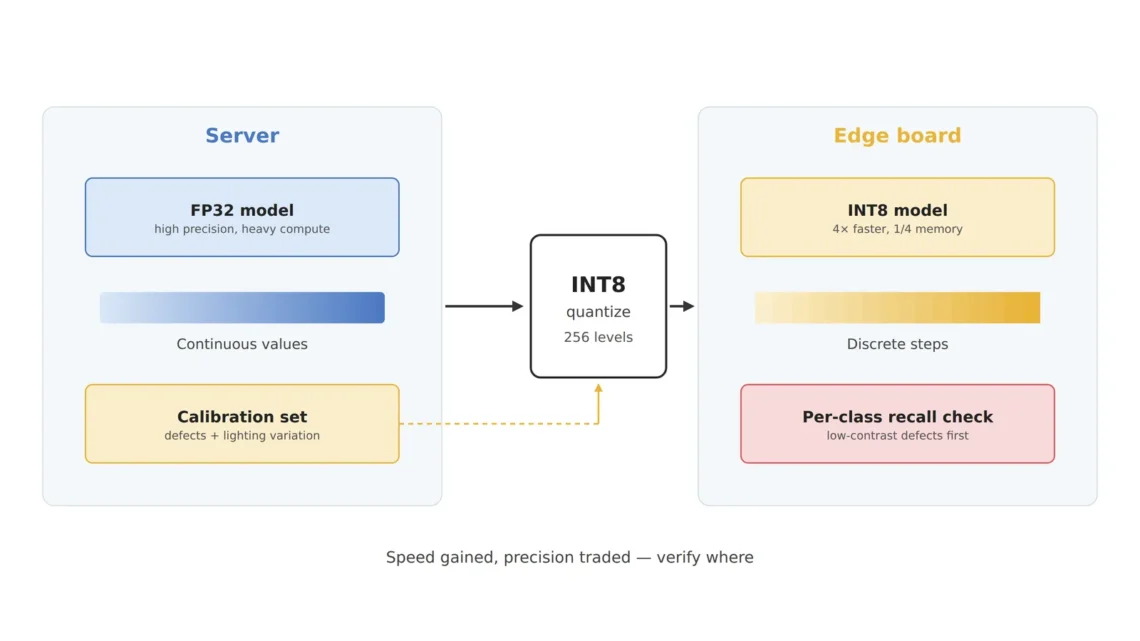
The second suspect is the number steps. INT8 quantization3 turns values computed as 32-bit floats into one of 256 integer steps. One value shrinks from 4 bytes to 1 byte, so storage drops to a quarter, and in return any difference that falls between steps gets merged into the same step.
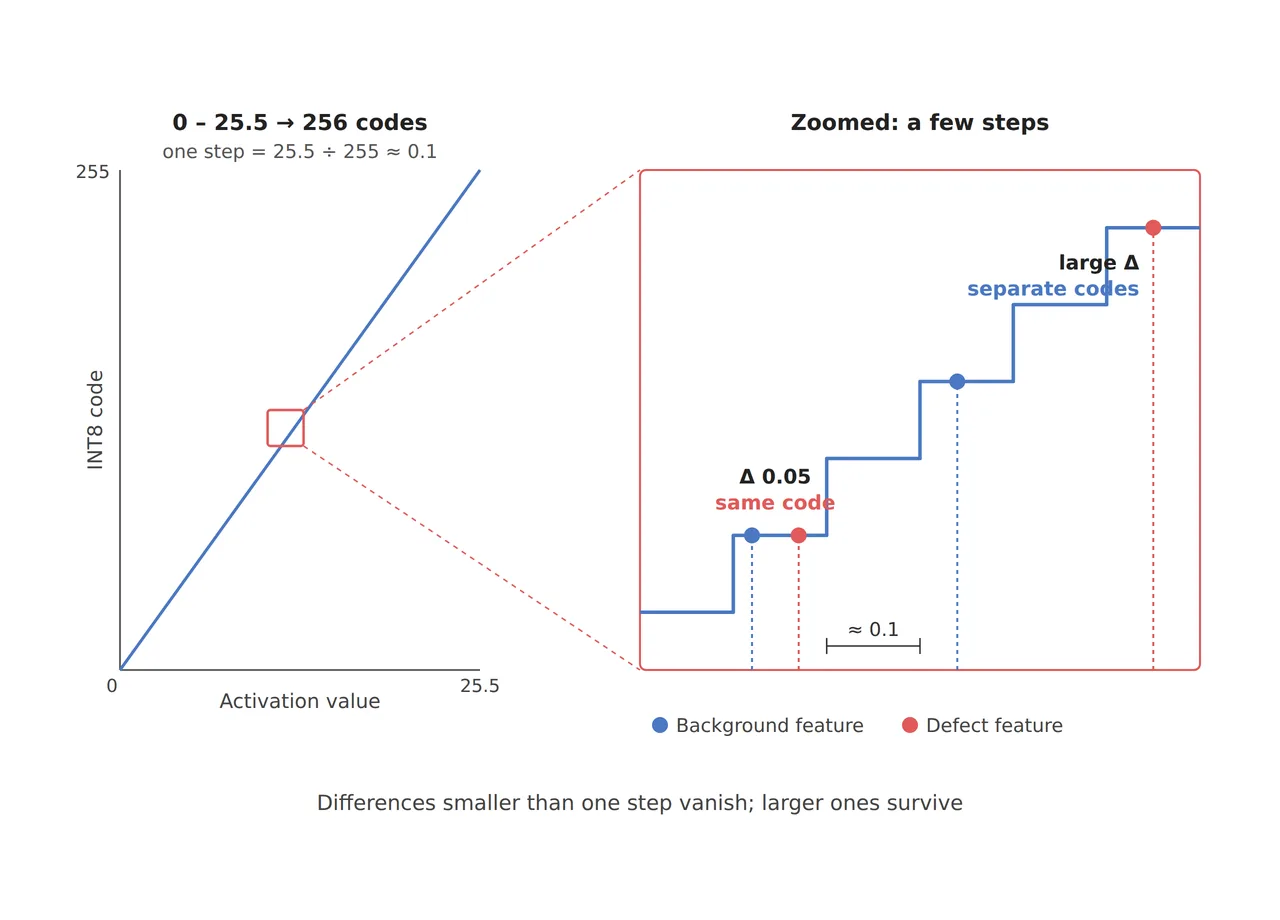
As in the figure, if a layer's activation4 moves between 0 and 25.5, one of 256 steps is 25.5 ÷ 255 = 0.1. If the feature difference between spot and background is 0.05, the chance the two values split into different steps is the difference divided by the step width, 0.05 ÷ 0.1 = 50%. The other half are merged into the same step and look identical to the model.
The step can get wider. The TensorRT5 documentation states that it uses a symmetric quantization6 scheme, and with a symmetric scheme centered on 0, the negative steps sit unused and only about 127 steps on the positive side remain, so one step over the 0 to 25.5 range becomes 25.5 ÷ 127 = 0.2 and the chance of a split falls to 25%. If blown-out hotspots mix into the calibration7 images and stretch the range to 0 to 51, one step is 0.4 and the chance is 12.5%. A few images that push the end of the range out end up erasing the differences of hundreds of black spots.
So the calibration images have to resemble the images that will actually arrive on the line. Include covers with black spots alongside good covers with slightly different lighting and lots, and add scenes where hotspots push the range up at the rate they occur on the line. I look at this image list as closely as at the accuracy table. Mixed precision8, keeping only sensitive layers at higher precision, is another road left. The layer-by-layer calculation of how micro defects disappear in INT8 is in a separate INT8 quantization article.
Server and board may not run the same TensorRT
The third place is the runtime that executes the numbers. NVIDIA's document on moving from TensorRT 10.x to 11.x sets out the Jetson situation separately. TensorRT 11.4.0 does not support JetPack, and Jetson deployments must remain on a TensorRT 10.x release supported by their JetPack version.
The same document says that IInt8Calibrator and all its subclasses have been removed in TensorRT 11.x, and directs you instead to make models marked with quantization points (Q/DQ)9 using Model Optimizer. With 11.x on the server taking Q/DQ models and the older calibrators still present in 10.x on the board, the road that sets the 8-bit steps can differ between server and board even for the same model. I would note the TensorRT version and quantization path actually used on the server and on the board right next to the accuracy table.
Feed the same image to both sides to find the culprit
One experiment separates the three suspects. Save the original camera image to a file, feed it identically to server and board, and save both the preprocessed input tensor10 and the model output on each side. If the input tensors already differ, preprocessing such as shrinking and color conversion is the culprit; if the inputs match but the outputs differ, it is the number steps or the runtime.
If the outputs split, run once more on the board with only the precision changed. If an FP16 engine built from the same model brings small-defect recall back in line with the server, the 8-bit steps are to blame; if it still splits, the runtime version difference remains. Going in this order lets you count where the 6 lost images dropped out, and I do not retrain a model without that number. From spot size to quantization settings, the three rows read as follows.
| Item | Value | Condition and basis | In plain words |
|---|---|---|---|
| ① Minimum defect size | 30 μm black spot = 3 px | Assumed resolution 10 μm/px, assumed brightness difference of 6 levels at 8 bits | The spot barely covers three pixels |
| ② Optical setup · WD | Matte cover, diffuse coaxial or dome light, WD{f(11)} and focus kept as in training | Changing light, WD or focus moves spot contrast away from the training distribution | Shoot at the same height and in the same light as in training |
| ③ Algorithm parameters | Matched downscaling interpolation, managed calibration range, small-defect recall drop allowance 2 points | INTER_AREA 25 to 56%, INTER_LINEAR 25 to 100%. Step widths 0.1, 0.2 and 0.4. The 2-point allowance is an assumption | Match the shrinking method and step width on server and board |
Of the three rows, the one that separates server from board is ③. The 3 px spot in ① can keep only 25% of its contrast depending on the shrinking method, and that faded spot is then merged again by the 8-bit steps, so the loss compounds. Tying the conditions in ② to those of training is groundwork to finish before arguing about ③. On a surface with some gloss, hotspots stretch the range further, so how well this calculation matches the line's numbers cannot be guaranteed before a sample test.
Finding and closing the places where server numbers and board numbers part ways is a large share of an edge AI engineer's work, and an eye that reads image processing and number formats together is the capital for it. For the team signing off on the deployment, putting class-by-class recall measured on the board into the acceptance conditions is safer than deciding on server validation accuracy alone. This article explains technology and is not investment advice. See our Disclaimer.
Field Note
If this cover moves to a board, I keep the 30 covers with black spots in a separate set and count recall on just those 30 on server and board. If even one of the 30 is missed only on the board, I save that image's input tensor on both sides and compare the values from the shrinking stage onward. On the same day I count how many images with hotspots sit in the calibration set.
Field Checkpoints
Once recall on the 30 black-spot covers is in from both sides, check the road between server and board one question at a time.
- Did you compare small-defect recall, in place of overall accuracy, separately on server and board? (a 20-point recall drop can hide behind a 0.6-point average)
- Is the downscaling interpolation the same in server training and board runtime? (INTER_AREA and INTER_LINEAR leave different contrast on the same spot)
- Do the calibration images include covers with black spots and variations in lighting and lots? (whether the range is set from good images alone)
- Are images whose hotspots stretch the range included in the calibration set no more often than they occur on the line? (twice the range means twice the step width)
- Did you record the TensorRT version and quantization path on server and board? (Jetson stays on the 10.x its JetPack supports)
- Were training images and line images taken at the same WD and focus, under the same lighting? (a change in lens height changes the spot's pixel count first)
Frequently Asked Questions
Does deploying in FP16 instead of INT8 make the problem go away?
FP16 steps are far finer, so differences like 0.05 are much less likely to be buried. In exchange each value takes 2 bytes, using twice the memory and bandwidth of INT8, and the speed advantage shrinks by that much. Mixed precision, keeping only sensitive layers in FP16, is the compromise, and the TensorRT 11 documentation points to Model Optimizer's AutoCast for that conversion.
Does feeding the original size without shrinking solve all of this?
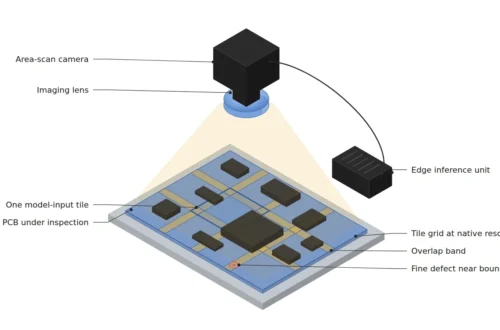
The interpolation difference disappears, but the compute grows in proportion to the input pixel count, so the board's time budget runs out first. That is why cutting only the region where spots occur at original resolution is considered alongside. Where to cut and how much to overlap is calculated in the tiled inference article.
Glossary
- [1] Recall recall
The share of real defects the model catches as defects. Catching 23 of 30 is 76.7%. ↩ - [2] Interpolation interpolation
The calculation that sets new pixel values from neighboring pixels when an image is shrunk or enlarged. Depending on the method, a small dot can get darker or fainter. ↩ - [3] INT8 quantization INT8 quantization
Converting 32-bit floats to 8-bit integers to lighten computation. It is close to turning a smooth ramp into a staircase of 256 steps. ↩ - [4] Activation activation
An intermediate value computed as data passes through each layer of a neural network. Where there is a defect, these values come out slightly different from the background. ↩ - [5] TensorRT TensorRT
NVIDIA's runtime that optimizes trained models to run fast on NVIDIA GPUs and Jetson. ↩ - [6] Symmetric quantization symmetric quantization
Quantization that centers on 0 and uses the same step width for positive and negative values. In layers that only output positive values, half the steps sit empty and the step width grows. ↩ - [7] Calibration calibration
The stage that runs representative images through the model to measure each layer's value range and set the width of the 8-bit steps. ↩ - [8] Mixed precision mixed precision
Using different number formats layer by layer. Sensitive layers stay in FP16 and the rest go to INT8. ↩ - [9] Q/DQ quantize / dequantize
Nodes inside a model marking where values are converted to 8 bits and where they are converted back. ↩ - [10] Input tensor input tensor
The array of numbers right before it enters the model, after preprocessing. A fair comparison needs this array to match on server and board. ↩ - [11] WD working distance
The distance from the front of the lens to the surface being inspected. When it changes, the same spot is captured over a different number of pixels. ↩
References
- NVIDIA, TensorRT 11.4.0 Documentation, Working with Quantized Types (symmetric quantization scheme), accessed October 24, 2026
- NVIDIA, Migrating TensorRT from 10.x to 11.x on Jetson/JetPack (IInt8Calibrator family removed, Model Optimizer Q/DQ, AutoCast, no JetPack support in TensorRT 11.4.0, Jetson stays on TensorRT 10.x), accessed October 24, 2026
- OpenCV 4.x Documentation, Geometric Image Transformations (resize default interpolation INTER_LINEAR, INTER_AREA description), accessed October 24, 2026
- Formulas: recall = defects caught ÷ all defects, accuracy drop = newly missed images ÷ all images, step width = range ÷ 255 (asymmetric) or maximum absolute value ÷ 127 (symmetric), chance of splitting into different steps ≈ difference ÷ step width. Contrast after shrinking was calculated by reducing a 3 × 3 px dot to a quarter with OpenCV resize at 16 positions
Related reading — Four Snags in Initial Jetson Orin Nano Setup · In Edge Inspection, Input Drift Shows Up Before Accuracy Drops · Why Edge AI Vision Fails on the Factory Floor

Noctvision
An engineer who has handled mechanical design and project management for production equipment since 2005. Here I work through the cameras, lenses and lighting that go into equipment with formulas and public data, and record the assumptions and sources alongside the numbers.


You May Also Like
What Changes in Vision Inspection When Logistics Automation Moves Into the Front End
Does Memory-Bank Anomaly Detection Need to Remember Every Normal Patch?