Raising the Camera Leaves the Glint of Its Built-in Light in Place
LIGHTING
On a glossy surface the hotspot stays at 7.5 mm however high the camera goes, and leaves the frame only after a 10.8° tilt.
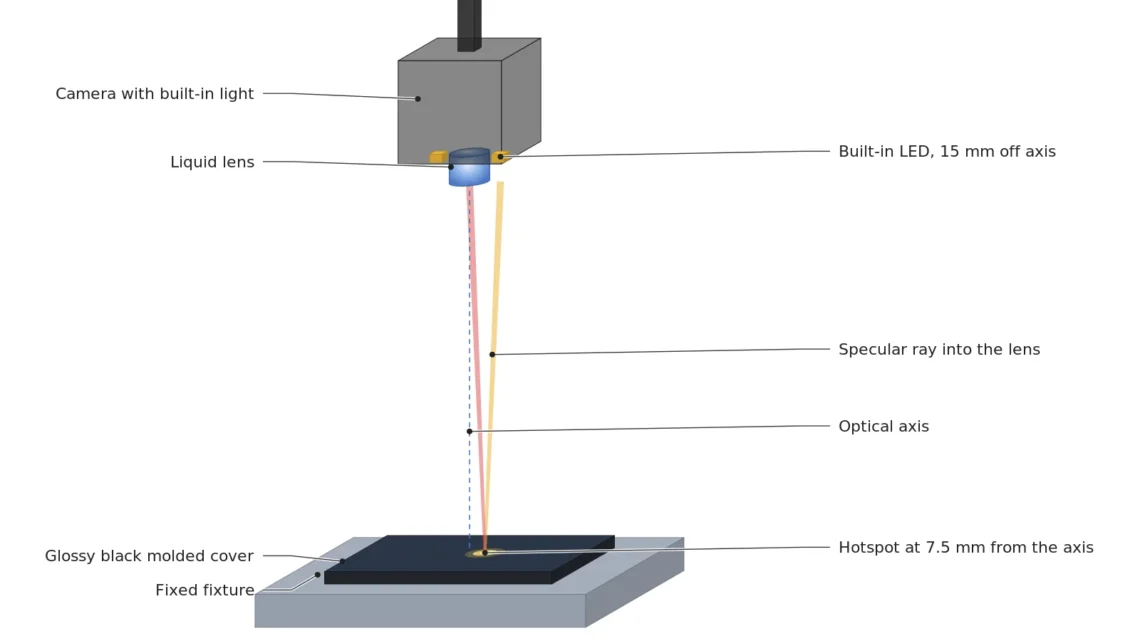
I hung a camera with its light built into the body over a glossy black molded cover and calculated where the hotspot lands, how bright it is, and what tilting costs.
About 15 min read
It sounds reasonable that a camera with the light inside its body makes the setup simpler. There is no separate light bracket to mount, and if a white dot on screen gets in the way, it seems you could just lift the camera a little higher. Clearview's write-up of VISION 2026, dated October 9, includes LUCID's Triton All-In-One. It puts a 3.2 MP global shutter sensor, a liquid lens1 and programmable LED lighting into one IP67 body, with release listed for the second quarter of 2027.
The target is a glossy black molded cover. As a plastic with a refractive index of 1.5, it sends 4 % of the light at normal incidence straight back like a mirror, and I assume a diffuse reflectance2, the light scattered back, of 5 %. The defect to find is a scratch 100 μm wide. On a surface like this, a scratch that falls inside a blown-out white dot leaves nothing on screen, and that cover goes into the good-parts box. Then comes the cost of putting one more person at the re-inspection spot.
The calculation comes first. I follow, in order, where the built-in light in the body puts a hotspot on this cover, whether raising the camera weakens it, and what tilting gives away. The camera is based on the 2,048 × 1,536 px specification and the 12 mm lens model LUCID published, and the pixel size is 2.25 μm from the Triton Lite specification, which uses the same sensor. Where and how many LEDs sit around the lens is not published, so I assume an emitting area 3 mm across, 15 mm off the optical axis.
A hotspot forms halfway between the LED and the lens
A glossy surface behaves like a mirror, sending light off in one direction at the same angle it came in. Where this specular reflection3 enters the lens is found with the mirror image of the lens. Stand in front of a bathroom mirror and the face in it stands the same distance behind the glass. The lens also makes a mirror image the same depth below the glossy surface, and the hotspot is where a straight line from the LED to that image crosses the surface. The 4 % that comes back from the surface is a Fresnel reflection4 value. The other 96 % goes into the plastic and is mostly absorbed by the black pigment, and only part of it scatters back out in all directions to form the background brightness. So the same frame records strong light that leaves in one direction and weak light that spreads everywhere.
When the LED and the lens sit at the same height, that line always crosses the surface at the halfway point. With the LED 15 mm off the optical axis, the hotspot sits 7.5 mm from the axis, and that distance does not change whether the WD5 is 100 mm or 300 mm. Write the equation and the height cancels out. The dot stays put. For the same reason the 3 mm emitting area becomes a dot 1.5 mm across on the surface, and that size does not depend on distance either.
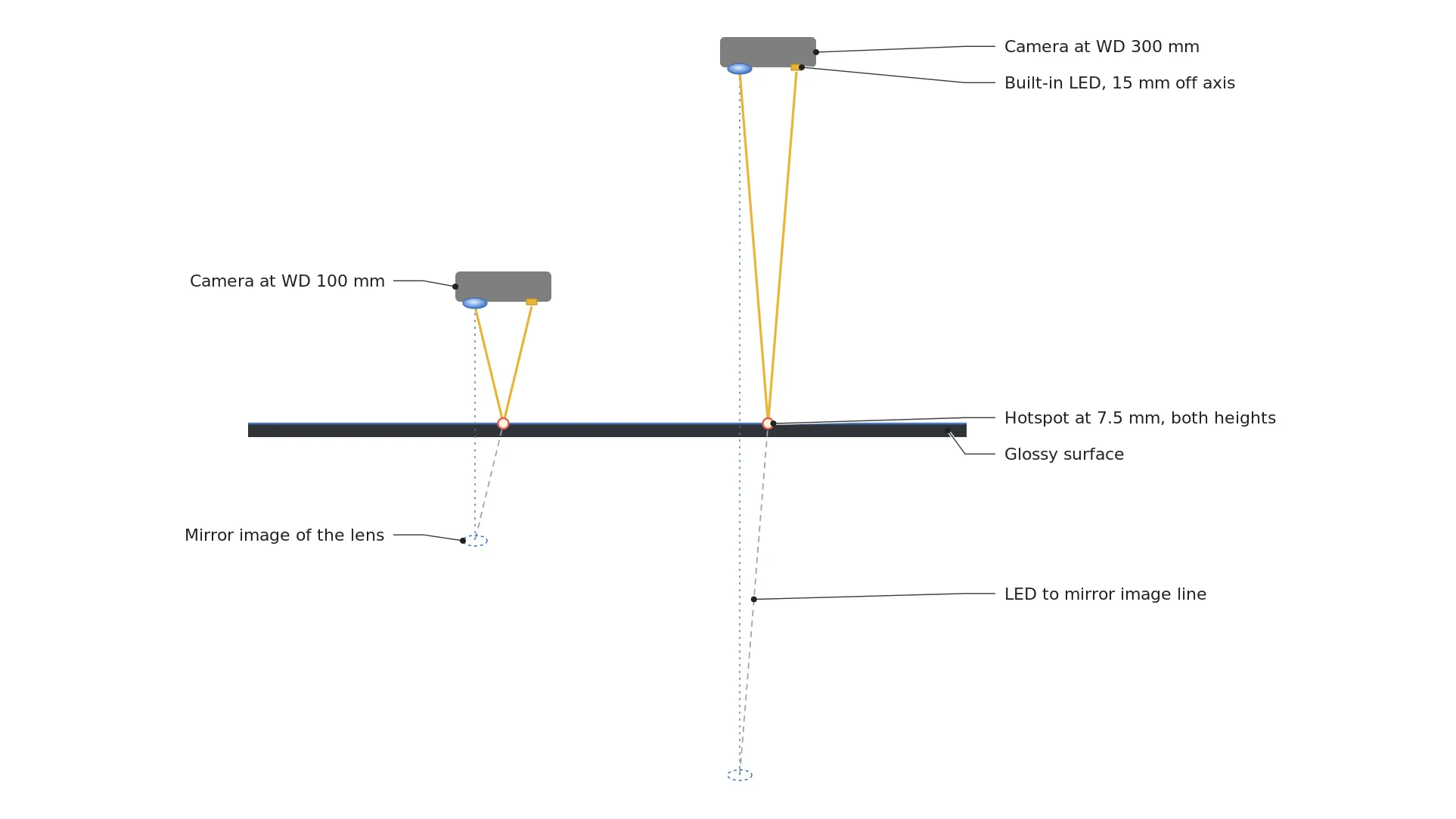
The two cameras in the drawing differ in height by a factor of three, yet the yellow rays meet the surface at a single point. My rule is to see a 100 μm scratch across three pixels or more, so one pixel must cover 33.3 μm or less, and with a 12 mm lens the limit is a WD of 189.8 mm. Hang the camera inside that, at 180 mm, and one pixel covers 31.5 μm, the field is 64.5 × 48.4 mm, and the hotspot lands 238 px from the image center as a circle 48 px across.
For the hotspot to leave the frame, half the field would have to be narrower than 7.5 mm. Even at this camera's closest distance of 100 mm the field is 25.3 mm tall, so the hotspot stays inside the frame at every height. I would draw that 48 px circle on the cover drawing first. Whether it overlaps places where scratches tend to appear, such as a logo border or a gate mark, is the first call.
Raising the camera darkens the background first
If the position stays put, the next thing to check is whether the brightness at least drops. Raising the camera lowers the illuminance6, the light reaching the surface, with the square of the distance, so going from 180 mm to 300 mm darkens the background to 0.36 times. The hotspot behaves differently. What the lens sees there is the LED's emitting area itself, reflected in a mirror, so its brightness is fixed at the emitter's brightness times 4 %, whatever the distance. Look at a window at night from a lit room: the street lamps outside fade as they get farther away, while the room's own lamp reflected in the glass stays just as sharp.
Dividing the two brightnesses gives how many times brighter the hotspot is than the background. Treating the background as a surface that scatters evenly in all directions, the ratio is 4 % × π × distance² ÷ (emitting area 7.07 mm² × 5 %): 3,556 times at 100 mm, 11,520 times at 180 mm and 32,000 times at 300 mm. A 12-bit camera holds 4,096 brightness levels, so at 180 mm the hotspot goes past saturation7 even with the background pressed down to the darkest single level. In practice the background sits around mid-gray so scratches show, and light spreading into nearby pixels makes the blown-out circle bigger than the calculated 48 px. Light that bounces once more off an inner lens surface can also leave a faint smudge somewhere unexpected.
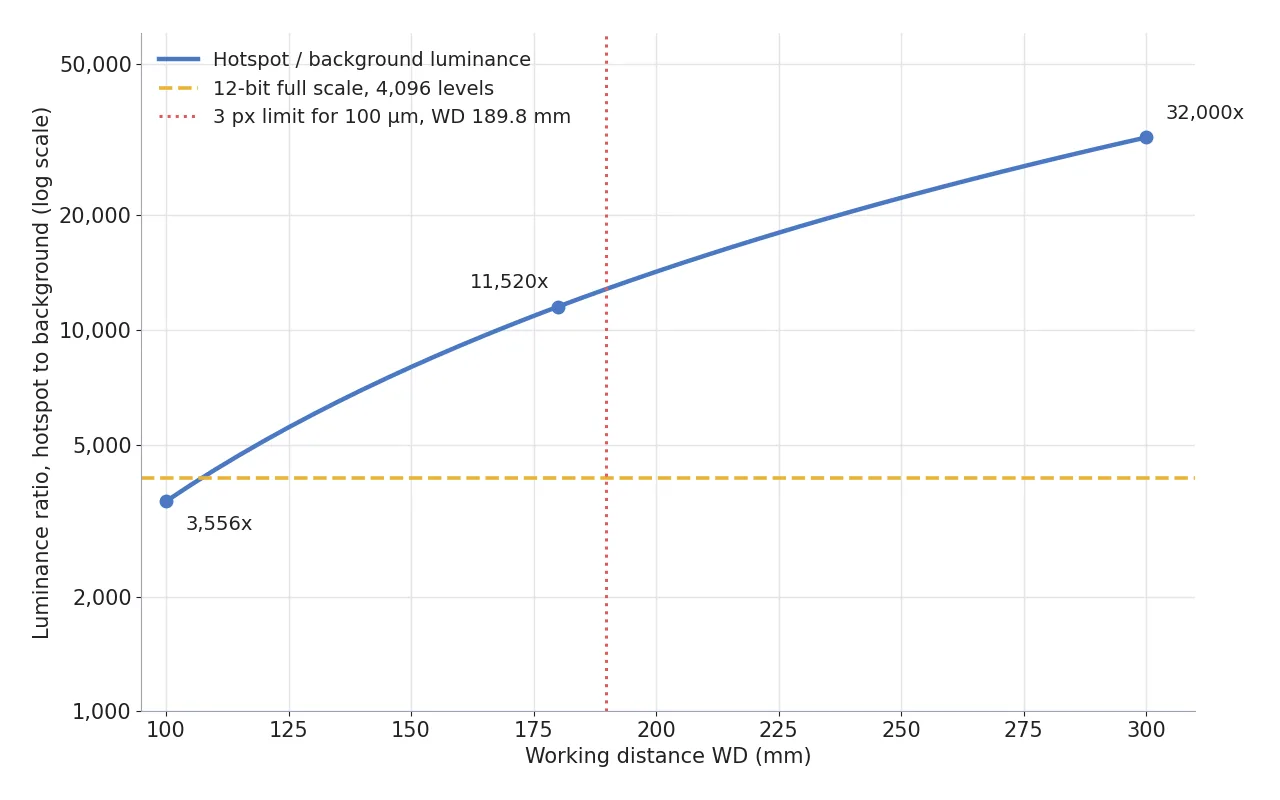
The blue line in the chart starts at 3,556 times at 100 mm, just under the yellow 4,096 line, crosses it near 107 mm and only climbs away to the upper right after that. Even at 100 mm, raising the background by two levels puts the hotspot into saturation. The red dotted line is 189.8 mm, where my three-pixel rule ends, so the height you can raise to while keeping the scratch also stops there.
Raise the camera higher
and the hotspot should weaken with it.
Go from 180 mm to 300 mm
and the background darkens to 0.36 times while the hotspot stays the same, so against the background it gets 2.8 times brighter, from 11,520 to 32,000 times.
Height is no handle. Raising the camera only sinks the background, and past 189.8 mm the scratch drops below three pixels. The variable left is the angle.
Past a 10.8° tilt the hotspot slides out of the frame
The angle becomes the variable because of how specular reflection works. Tilt the camera and the beam bouncing off the surface swings away by twice the tilt, and the hotspot that returns to the lens moves to near the foot of the perpendicular dropped from the camera to the surface. On screen it lands roughly the tilt angle away from the optical axis, so once that angle passes half the field of view, the dot leaves the frame. Because the LED sits off to the side of the lens, the dot is pushed a little to one side, and it leaves faster in one tilt direction than the other. The calculation uses whichever LED leaves later.
The vertical field of view of the 12 mm lens is 16.4°. Half of it is 8.19°. Placing LEDs 15 mm on both sides of the axis and including the size of the hotspot, the smallest tilt that takes the hotspot fully past the frame edge is 10.81°. The 6 mm lens has a 32.1° vertical field, so it needs 18.68°, and at 180 mm one pixel covers 65.3 μm, leaving the 100 μm scratch at only 1.5 pixels. The wider the lens sees, the larger the angle needed to avoid the hotspot, so for this cover only the 12 mm lens remains.
Put a flash in the hot shoe on top of a film camera and photograph someone face-on, and their pupils often come out red. Light returning from inside the eye goes straight back into the lens right next to the flash, and a bracket that mounts the flash farther from the lens opens up the angle between them. A light built into the body cannot move away from the lens, so the whole camera tilts to make the same angle. By my standard, the first line of this setup's spec sheet is the number 10.8°.
Tilting pushes the top and bottom edges out of focus
With the camera tilted, the top and bottom edges of the frame sit at different distances from the lens. Tilt by 10.81° with the frame center at 180 mm, and the depth along the optical axis is 175.2 mm at the bottom edge and 185.1 mm at the top, a spread of 9.9 mm. The liquid lens's f-number8 is not in the published material, so I set it to f/4, and with a circle of confusion9 of two pixels, 4.5 μm, the depth of field10 at 180 mm is 7.56 mm.
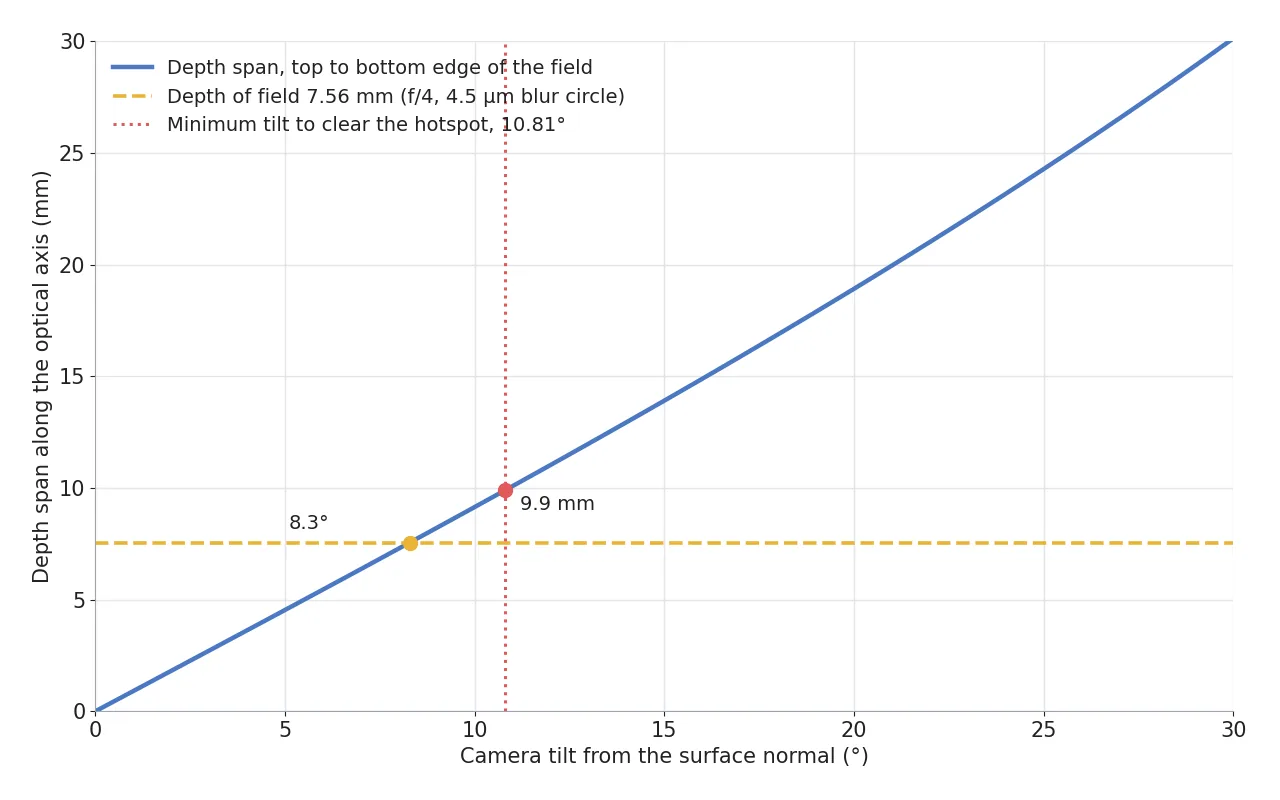
The blue line in the chart crosses the yellow 7.56 mm line at 8.3°, and the 10.81° needed to clear the hotspot lies to the right of that. A liquid lens moves the whole focal plane forward and back but cannot tilt it, so with focus set at the middle, the top and bottom edges each fall about 1.2 mm outside the depth of field. Once scratch edges start to spread by a pixel or two at those edges, I stop trusting the numbers on that screen.
7.5mm
Where the built-in light puts its hotspot (LED at 15 mm assumed, independent of WD)
10.8°
Smallest tilt that takes the hotspot out of the frame with a 12 mm lens
9.9mm
Depth spread between the top and bottom edges at that tilt (DOF 7.56 mm)
Covering the depth spread needs an f-number above 5.24, which on a real scale means f/5.6. Closing one stop from f/4 cuts the light by a factor of 1.96, so the exposure time nearly doubles. Pixel size also changes from edge to edge: the top edge goes to 33.9 μm, and the 100 μm scratch covers 2.95 pixels, just short of my three-pixel rule. This path erases the hotspot by giving up a little light and a little resolution.
Two LEDs fired in turn at a still station
There is one more way to erase the hotspot without tilting the camera. Fire the LEDs on either side of the axis in turn, and the hotspot lands at two separate places, +7.5 mm and −7.5 mm; pick the darker value at each pixel from the two frames and both dots drop out. US patent US7398927B2, filed in 2005 by Datalogic Scanning, covers a reader that fires two rows of LEDs alternately and keeps the lower value at each pixel to reduce specular reflection. The two dots are 476 px apart center to center and 48 px across, so they never overlap.
The condition is that the cover stays still between the two frames. At 78 fps the frames are 12.8 ms apart and a pair takes 25.6 ms, and for the cover to stay within one 31.5 μm pixel in that time it must move no faster than 2.46 mm per second. The cover has to be stopped. Whether this camera can fire its LEDs zone by zone is not in the published material, so it is an item to confirm on the spec sheet.
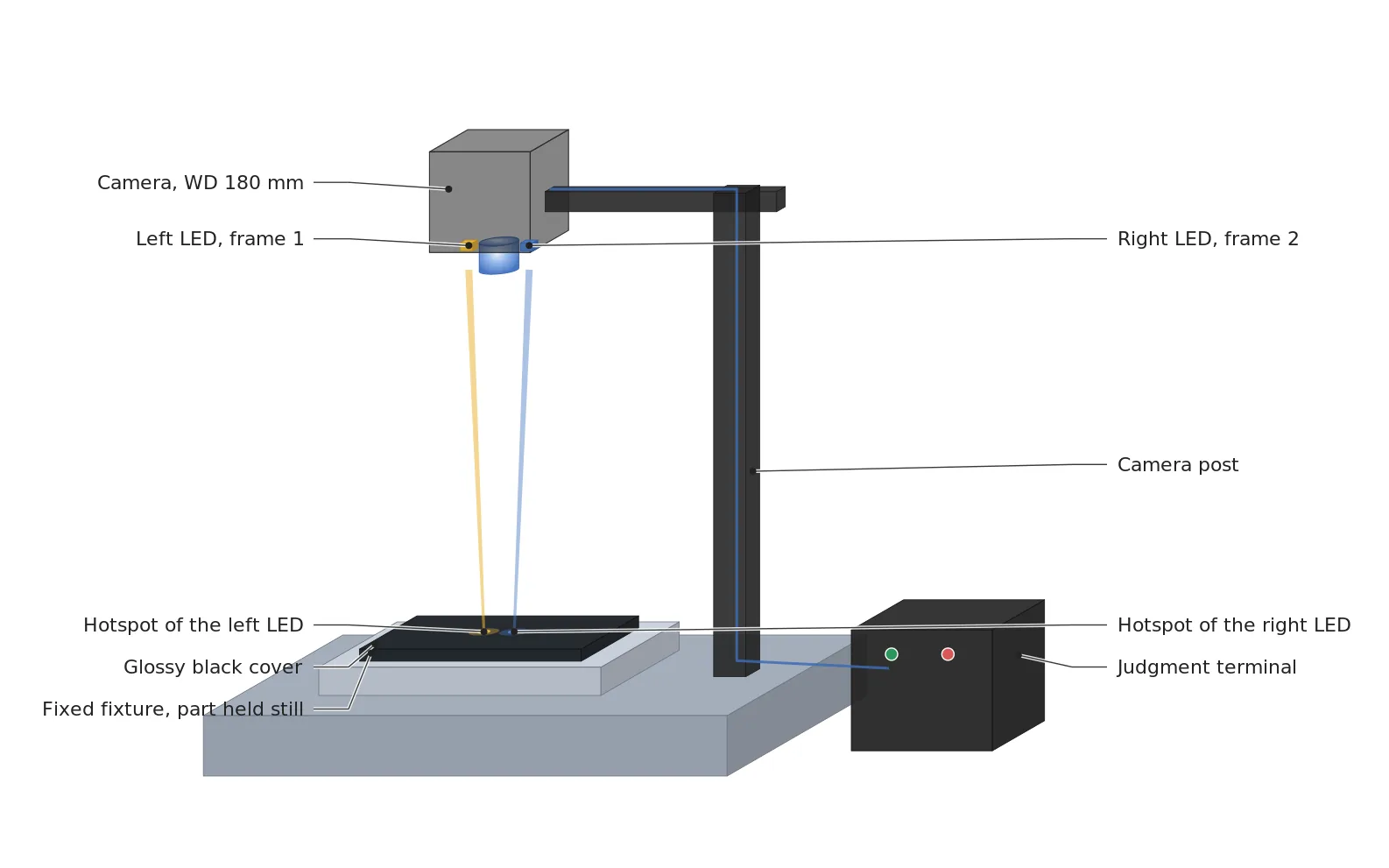
The drawing centers on the fixed fixture and the cover under a camera standing upright, and on where the two hotspots fall on the cover, left and right. The frame lit by the left LED keeps only the left dot white, the frame lit by the right LED keeps only the right dot, and the judgment terminal receives the merged image. The camera stays upright at a WD of 180 mm, so the depth spread and pixel size differences that came with tilting do not appear.
| Setup | ① Smallest defect | ② Optical setup · WD | ③ Algorithm parameters · In plain words |
|---|---|---|---|
| Upright, one frame | 100 μm = 3.17 px (31.5 μm/px) | 12 mm lens, WD 180 mm (3 px limit 189.8 mm), all built-in LEDs on | The 48 px hotspot circle is excluded from judgment. Scratches inside it are missed |
| 10.8° tilt | 2.95 px at the top edge, 3.29 px at the bottom edge | 12 mm lens, center WD 180 mm, f/5.6 (at the assumed f/4, the 9.9 mm depth spread exceeds the 7.56 mm DOF) | About twice the exposure, pixel size corrected top to bottom. No hotspot, but the frame edges blur easily |
| Upright, both sides in turn | 100 μm = 3.17 px | 12 mm lens, WD 180 mm, one frame per LED on each side of the axis | Per-pixel minimum of two frames, 12.8 ms apart, 25.6 ms per pair, motion at most 2.46 mm/s. Erases both dots on a stopped cover |
Lined up side by side, the three rows show that erasing the hotspot is paid for in a different place in each row. The one-frame row gives up scratches inside the circle, the tilted row gives up light and sharpness at the frame edges, and the alternating row gives up time and needs the part to stop. The conditions that favor the opposite approach are just as clear. If the surface is matte and specular reflection is weak, if the cover keeps moving, or if there is no feature to judge where the hotspot lands, a single frame with the built-in light as is stays simpler, and if the whole cover is curved, a separate dome light outside is the better choice. How well these numbers hold on the real cover's gloss and curvature cannot be guaranteed before a sample test.
Homework left by a camera with its own light
Before choosing the camera, look at whether the cover surface is close to a mirror. If it is, draw the hotspot position, such as 7.5 mm, on the drawing and choose between tilting and alternating to avoid it. I would look at alternating first for a stationary station and at an outside light first where the cover moves. If you are starting out, I recommend drawing the mirror image to find the hotspot once on paper.
The people who do this drawing and calculation for a living are machine vision engineers, and having someone who can say where the hotspot will land the moment the light is chosen shortens commissioning. From the side that pays for the equipment, a camera with built-in light saves a bracket, a light controller and wiring, but on glossy parts a tilting fixture or the time for two frames gets added to the bill. Calculating that cost before setup cuts down on remachining fixtures later while swapping lights. This article explains technology and is not investment advice. See our Disclaimer.
Field Note
If I look at a glossy cover with this camera, I first replace the cover with a black flat plate of the same gloss 180 mm below and take a picture with only the LEDs on. Measure how many mm from the image center the white dot lands, and twice that distance is the unpublished distance between the LED and the optical axis. With that value I recalculate the real minimum tilt in place of 10.8°, and with the camera tilted I put a slanted-edge chart at the top and bottom edges of the frame to see across how many pixels the edge spreads.
Field Checkpoints
Once one flat-plate picture has told you where the LED is, turn the hotspot, the tilt and the number of frames into spec-sheet sentences and answer the questions below one by one.
- Is a WD of 180 mm (12 mm lens, 3 px limit 189.8 mm) secured after adding the cover and fixture heights? (whether there is room to hang the camera at this height)
- Did you confirm the LED position as twice the hotspot distance measured on the flat-plate picture? (whether you recalculate the hotspot position and tilt if it differs from the assumed 15 mm)
- Does the hotspot circle (1.5 mm across, 48 px) stay clear of places where scratches tend to appear, such as a logo border or gate mark? (if it overlaps, whether scratches there are missed)
- If you tilt, does the depth spread between the top and bottom edges fit inside the depth of field set by the f-number? (9.9 mm against 7.56 mm at the assumed f/4)
- If you alternate, can the LEDs be fired zone by zone, and does the cover stay still for the 25.6 ms between frames? (whether you check this with the camera spec sheet and the fixture)
- Did you check with sample pictures that a curved or matte cover does not reflect differently from the calculation? (whether you avoid concluding from the calculation alone)
Frequently Asked Questions
Do I need to worry about a hotspot on a matte molded part?
A matte surface scatters light in all directions, so specular reflection concentrated in one point hardly forms. The brightness difference the built-in light makes is then mostly an illuminance difference from distance and angle, showing up as frame edges a little darker than the center. That much is handled with exposure and flat-field correction, and it is the surface where a camera with built-in light is easiest to use.
Does a polarizing filter in front of the lens erase the hotspot?
Specular reflection from non-metal surfaces such as plastic largely keeps the polarization of the incoming light, so polarizing filters at right angles in front of the light and the lens cut it a lot. The condition is that the light side also needs a polarizing filter, so the first question is whether a filter can go in front of the built-in light. Two polarizing filters also cut a lot of light, so the exposure margin has to be calculated with them, and on metal plating the result differs and needs a sample to confirm.
Glossary
- [1] Liquid lens liquid lens
A lens that moves its focus by changing the curvature of a liquid boundary with a voltage. It focuses with no moving parts. ↩ - [2] Reflectance reflectance
The share of light that bounces back from a surface. A black molded part has a low diffuse reflectance, so under the same light it records darker than white plastic. ↩ - [3] Specular reflection specular reflection
Reflection from a smooth surface that leaves in one direction, at the same angle as the light came in. A street lamp on still water shows up as a single point for this reason. ↩ - [4] Fresnel reflection Fresnel reflection
The part of the light that turns back at the boundary between two materials with different refractive indices. For plastic with an index of 1.5 at normal incidence, ((1.5 − 1) ÷ (1.5 + 1))² = 4 % comes back. ↩ - [5] WD working distance
The distance from the lens to the surface under inspection. The calculation here uses the thin lens approximation, measured from the lens center. ↩ - [6] Illuminance illuminance
The amount of light landing on a surface, in lx. From a point source it falls to a quarter when the distance doubles. ↩ - [7] Saturation saturation
The state where a pixel reaches its brightest value and can no longer tell brighter light apart. On screen it shows as a blown-out white area. ↩ - [8] F-number f-number
The focal length divided by the diameter of the lens opening. Closing one stop from f/4 to f/5.6 lets in about half the light. ↩ - [9] Circle of confusion circle of confusion
The diameter up to which a defocused, spread-out point is still counted as sharp. Here it is set to 2 pixels, 4.5 μm. ↩ - [10] Depth of field depth of field, DOF
The depth range that stays sharp in front of and behind the focused distance. It widens as the aperture closes. ↩
References
- LUCID Vision Labs, LUCID at VISION 2026 (Triton All-In-One TAO034S: 2,048 × 1,536 px, 78 fps, 2.5GigE, IP67, 6 mm 42° × 31°, 12 mm 22° × 16°, WD 100 mm to infinity, Triton Lite 2.25 μm pixels), accessed October 20, 2026
- Clearview Imaging, What Vision 2026 Told Us About Where Machine Vision Is Heading (October 9, 2026, liquid lens, LED lighting and release timing of the Triton All-In-One)
- US patent US7398927B2, Datalogic Scanning Inc, Data reader and methods for imaging targets subject to specular reflection (filed 2005, two rows of LEDs fired alternately, keeping the lower value per pixel)
- US patent US8212857B2, Microsoft Corp, Alternating light sources to reduce specular reflection (filed 2007, combining images taken with alternating light sources to reduce glare spots)
- Formulas: hotspot position = LED-to-axis distance ÷ 2, Fresnel reflectance = ((n − 1) ÷ (n + 1))², hotspot to background = specular reflectance × π × distance² ÷ (emitting area × diffuse reflectance), pixel footprint = pixel × (WD − f) ÷ f, depth of field ≈ 2 × N × c × (m + 1) ÷ m² (m = f ÷ (WD − f))

Noctvision
An engineer who designs secondary-battery manufacturing equipment keeps this record while studying local AI on single-board computers such as the Raspberry Pi and Jetson.

You May Also Like
The Camera Cannot Be Bolted On Last — Reserving Space and WD for Vision Cameras and Lighting at the Mechanical Design Stage
The Surface You Could Only See at a Standstill — How Color-Multiplexed Strobing Breaks the Standstill Condition of Photometric Stereo